Building discardable but hyper-specific tools is a great use-case for LLMs
Published on Aug 27, 2026 • 6 min read
We’re planning to screen Mrinal Sen’s Ek Din Pratidin on 1st September for Cinema Next Door.
It’s a Bengali film and I wasn’t satisfied with the quality of subtitles I found online. The best subtitle file was decent translation-wise, but it was still wildly out of sync with the video in terms of timing.
So, next step, I obviously decided that I was going to take on the tedious task of manually fixing the subtitles.
Manually editing subtitle files are no fun
A subtitle file is essentially just a text file with a list of timestamps and the text that should appear on the screen corresponding to that timestamp.
This is what it looks like:
1
00:02:17,746 --> 00:02:21,551
What is it? What happened?
How did it happen?

2
00:02:22,052 --> 00:02:23,374
He fell down while playing.

3
00:02:23,490 --> 00:02:25,551
Why did you bring him here?
Take him to the doctor.
Manually editing a file like this is not very pleasant.
I looked for tools online that could make the process easier. There are a few free and open source options available. The popular ones look like they belong to the Windows 98 era.
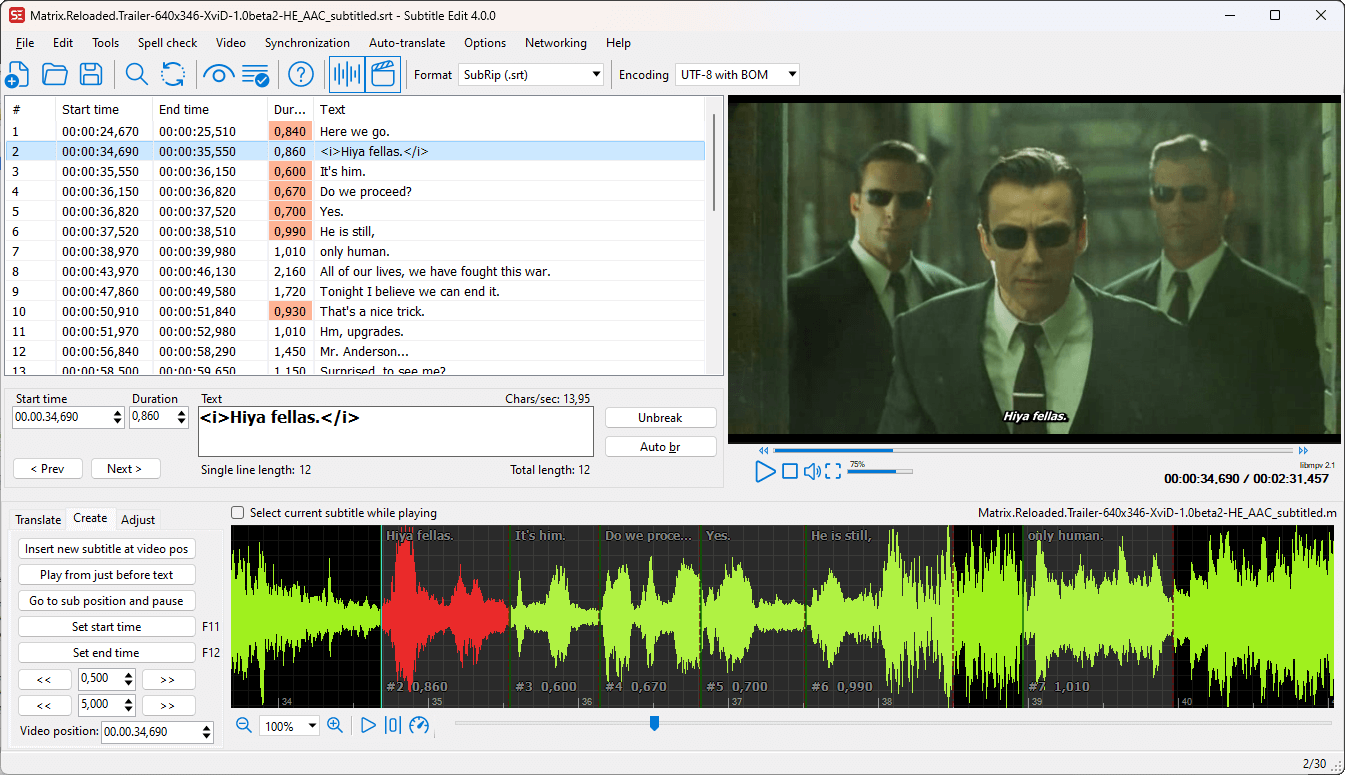
All ready-made apps come with opinions and learning curves
The trouble with using any new app is that you have to learn its interface and how it works.
Every app comes with an opionated perspective on how to do things. (And they should! These opinions are usually well thought out for regular users of the app.)
For someone new, it can create a steep learning curve. You have to reshape your own intuitons to align with the choices made by the app.
And when you can’t figure things out, you have to look for tutorials, documentation, or go scroll through random internet forums to find answer to basic questions.
While that might make sense when you are doing something on a regular day-to-day basis… Why do I have to do all that and adapt someone else’s mental model when I’m only trying to solve one specific problem just once?
With LLM-generated tools, the interface can adapt to you instead of the other way around
I can’t make myself use apps like that anymore.
As a designer, what happens when I have to use a clunky app which doesn’t appear intuitive to me is that instead of getting on with the actual task at hand, I just keep thinking of redesigning the entire app from scratch the entire time.
So, that’s kind of what I did.
But instead of doing it myself, I just asked Codex/ChatGPT to create something. The result was surprisingly great!
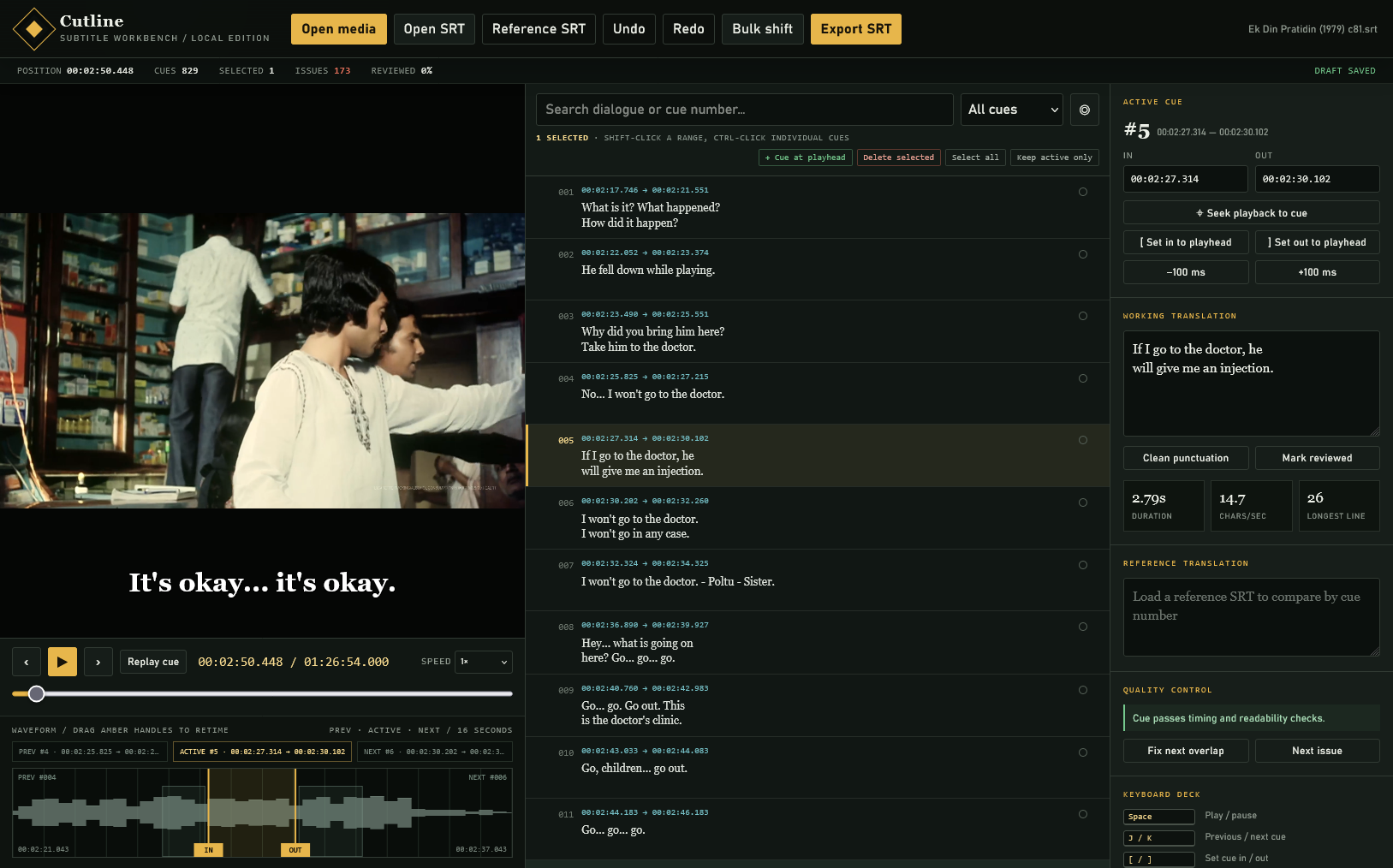
It got a pretty decent, usable result out of the box with just a single prompt.
For the attached srt file, I want to fix both the timing of the cues and the corresponding text. Generate a standalone html tool which will help me make corrections to the srt file.The best thing about a custom tool like this is that there is almost no learning curve.
Whenever I came across an annoyance or came up with an idea that could make things easier or faster for me, I just asked Codex to incorporate that in the tool.
For example, when I first started editing the file, the timing of consecutive lines would sometimes overlap by a few milliseconds. It took just another prompt to make a change in the interface so that I would avoid making that mistake:
When a cue is selected, also show me the timings of the previous and the next cues on the audio waveform (maybe faded relative to the selected cue)
After a few alteration and iterations, working on it felt rather pleasant and I was actually enjoying the process.
Cheap discardable code opens up possibilities to make things we wouldn’t before
A couple of years ago, I would never consider creating a custom subtitle editor for myself.
The time-cost of writing code for even a basic tool would be hard to justify. It would take weeks or months before one could arrive at something which was even remotely useful.
I had tried creating a poster making tool (an Electron app) for my Master’s degree final project in 2020. I spent around 6 months on it, and it was still barely usable at the end.
Previously, because of this time-cost, software which was not reusable or general purpose enough would not be reasonable to build.
But, thanks to LLMs, code is now cheap. Which also makes it discardable.
In this case, I only needed a solution to something which would help me fix this particular problem (bad subtitles) for this particular film in the way I find most intuitive today. (And I may not even ever use it again!)
Because LLMs can do all this in a few minutes (or hours, depending on the complexity of the task), I don’t need to worry about making a polished, feature-rich or maintainable piece of software. I can afford to make something which I use today to solve my problem and then it doesn’t need to exist tomorrow.
This, I find very exciting!
It now makes sense to build things we would never even try before: tools built around our own mental models, for highly specific or non-recurring tasks